
I can succesfully import my nano wallet and insert my password. But when I click sign in just nothing happens… What can I do to solve this problem? I’m not that great with computers…
Could you provide more informations?
Did your wallet is successfully loaded?
Which version are you using?
Which OS?
Could you provide screenshot?
Because I am a new user I can not upload a screenshot (?)
my wallet is succesfully loaded and I am using version 2.0.14
I’m running windows 7
New users can post screenshots, just not multiple screenshots. To make sure, I have upgraded your user account. Please post a screenshot of the issue, thanks.
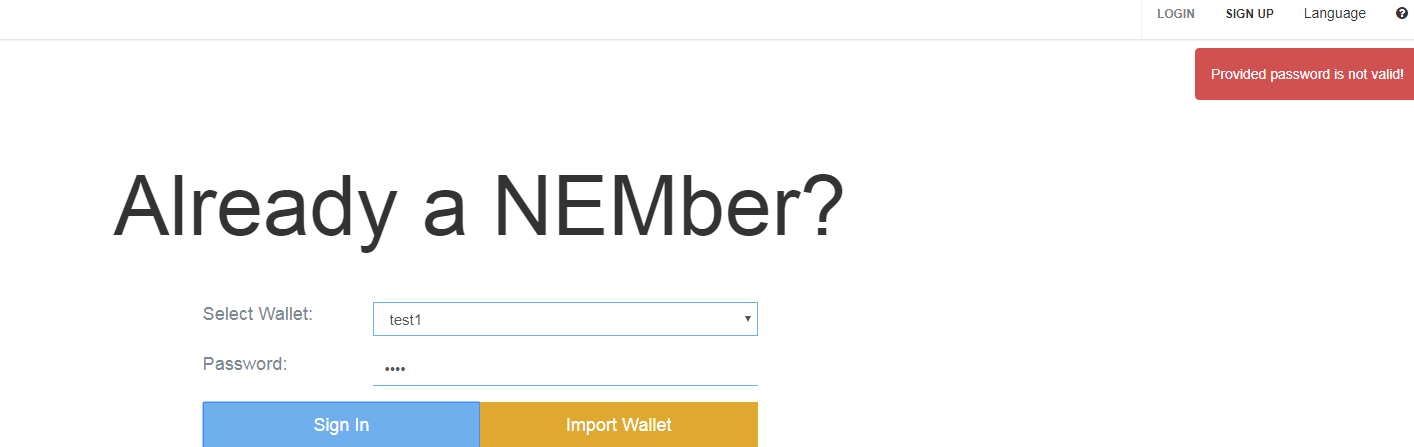
I’m sure that it is correct. I do not get a message like that or anything. Just nothing happens when I click
Have you wlt file?
Could you try get univeral client version:
https://github.com/NemProject/NanoWallet/releases/download/2.0.14/NanoWallet-2.0.14.zip
import wlt file and try login ?
You should be unable to create wallet in Mijin network …
@Quantum_Mechanics @mizunashi
Could you guys look at this? I don’t understand how possible is to create wallet in Mijin network.
Source topic:
I created this wallet a few months ago… around september, than I bought some NEM coins and didn’t do anything with it until a few days ago I wanted to sign in and it just doesnt work…
Do you remember you address? Now you are using 2.0.14 and that’s mean you upgrade your nanowallet , yes?
Is there an old wlt file acquired when creating an address?
It is highly likely that the imported wlt file is broken.
If there are multiple wlt files remaining, please try all.
If you still can not solve it, there is only a way to use the backup of the private key.
I created the wallet on version 1.4.13 and I also tried to log in on that version but it didn’t work…
I tried all versions and nothing works, how do I use the backup of the private key?
Private key is 64 signs available to backup when you create wallet. If you have these key you should be able to import it using sign up - > private key wallet and provide there your private key backup.
You can try also use @Quantum_Mechanics app to try decrypt your wlt file using password. Before you try do it please read also entire post topic:
@Saul @Rens_Seuren @mizunashi @Quantum_Mechanics
I move private messages here. Maybe someone will solve this.
I think you have it covered, it looks like @Rens_Seuren created a mijin wallet by mistake, following the guide you posted will be how he can recover his XEM.
@Saul
Mijin network wallet creation was never active in nanowallet. @Quantum_Mechanics have written about this here:
NEM locked me out of my Mijin Wallet
So it looks like @mizunashi told. It’s probably corrupted wlt file.
mijin hosts an online wallet, I was assuming thats where wallet was created. I could be wrong though. But it does look like the wlt file is corrupted, like @mizunashi mentioned.